Are you an APEX enthusiast or just want to learn more?
Well, this is your chance! I have created a new APEX Meetup Group in Leeds. This will be the first of its kind in the UK and the first event has been planned for August 13th 6 - 9pm It will be held at the University of Leeds so keep the date free in your calendar and come join us. Tell your friends and your colleagues, all are welcome.
RSVP for the Event Now: http://www.meetup.com/orclapex-Leeds/events/191140412/
Join the Meetup Group Now: http://www.meetup.com/orclapex-Leeds/
So why have I decided to do this?
Well, anyone who knows me will know that I am a massive Geek and also that I live and breathe APEX. This is another way of getting involved in the APEX community and sharing knowledge and ideas with each other. It is the first time I have run this kind of event but with the meticulous planning and great people, both presenting and attending, I'm sure this will be a success! I want to emphasise that this event is not solely for those based in Leeds. Everybody is welcome, from near or afar!
Thank you
The next thing I want to say is a massive thank you to Anthony Rayner from Oracle for agreeing to come up and present and show us some of the great new features APEX 5.0 has to offer, as well as helping to plan the event and put it together.
More about the Event
We have left the arrival time open so you can come any time between 6 and 7, which will allow people to come either straight from work or a little later. It will also give time for anyone coming by train or further afield the chance to get to Leeds. Around half 6 we will be getting some pizzas for everyone and if you do come a little later we will have some left so don't worry. We will also have some refreshments for everyone.
Around 7 there will be a welcome talk outlining some of the plans for future events. This will be followed by the eagerly anticipated presentation from Anthony on APEX 5.0. We will then have a short break for refreshments.
We are then going to end with a Q&A Panel with some APEX Experts that are ready to answer any questions you throw at them so make sure you have some questions ready.
Spaces are limited so RSVP Now
After the event, we're going to be heading into town for a drink or two. Of course, all are welcome to join us.
If anyone has any questions, feel free to send me an email or post a comment and I will be happy to answer.
Tuesday, 1 July 2014


Tuesday, 15 April 2014
Just Gage
This is just a quick post, in one of my applications I needed a nice gage.
After viewing a few options I decided to use Just Gage.
To set it up it was pretty simple:
Download the Javascript files and link in the page template:

Next create a new region with some Div's where the Gages will Appear and some items to retrieve your value:


 Next the Javascript:


After viewing a few options I decided to use Just Gage.
To set it up it was pretty simple:
Download the Javascript files and link in the page template:
Next create a new region with some Div's where the Gages will Appear and some items to retrieve your value:
Nearly there now for the dynamic action, just a page load dynamic action that will execute javascript:
Now the final home page, this is just an example. Just gage has many custom options that can be used including custom selectors so you can set levels and varying colours which is very useful.
I will get round to turning this into a plugin but might take me a little while. When I did this in the production app I had 4 gages going across the page which gave a really nice dashboard feel.
Tuesday, 18 February 2014
Joining the AE Network
I have been working for APEX Evangelists for nearly five years now, during which time I have learnt a great deal and worked on many different projects with a variety of clients. Over these past few years, I have developed many new skills and techniques, which have helped me grow as a developer.

The next stage of the transition for me is becoming a member of the AE Network, which is a great honour and I look forward to what the future holds.
Tuesday, 11 December 2012
Twitter Bootstrap Checkboxes and APEX 4.2
The issue:
I had an APEX application in which I included Twitter Bootstrap during development. This application was developed prior to the grid layouts and Twitter Bootstrap being shipped with APEX 4.2. The below fix works successfully for firefox only.
This is what happened on my page in both IE and Firefox. There is extra white space to the right of my page:

After spending some time looking into this, I realised the issue was related to the checkbox items on this page and the same happened on other pages.
When I looked at the html for the checkbox in firebug, I found the following:
<fieldset class="checkbox_group" id="P11_CK1" tabindex="-1">
<legend class="hideMeButHearMe">test</legend>
<input type="checkbox" checked="checked" value="Y" name="p_v11" id="P11_CK1_0"><label for="P11_CK1_0">Show Planned Spend</label>

</fieldset>
If I then removed the “legend class” from the html, the white space disappeared and my page reverted to the correct size.
As Bootstrap is now shipped with APEX 4.2, my next step was to check the css contained within the original Bootstrap css file I included for the “legend class”. It contained the following:
legend {
  display: block;
  width: 100%;
  padding: 0;
  margin-bottom: 27px;
  font-size: 19.5px;
  line-height: 36px;
  color: #333333;
  border: 0;
  border-bottom: 1px solid #eee;
}
After this I checked the css shipped with APEX 4.2 and realised there was a conflict so I commented out the “legend class” directly in the originally included Bootstrap css file:
This is line 889 – 901 in the version of the “bootstrap.css” I’m using.
/*
legend {
  display: block;
  width: 100%;
  padding: 0;
  margin-bottom: 27px;
  font-size: 19.5px;
  line-height: 36px;
  color: #333333;
  border: 0;
  border-bottom: 1px solid #eee;
}
*/
The css shipped with APEX 4.2 is then used and the problem resolved.
Wednesday, 21 March 2012
It's a Theme Changer
A couple of times recently I have been asked how you can change the colours of APEX report and change the styling of the application without changing the theme. I created a quick app so I could give example.
The way I tend to do this is create a separate style sheet that overwrites the standard APEX style sheet. I also use firebug to help me do this as it certainly makes life easier.
If you dont have firebug Its definitely something I would recommend, my preferred browser to use it with is firefox but you can get lite versions for other browsers too.
First of all I would find the styling for what I want to change by inspecting the element in firebug and change it on the fly to preview my changes
Here’s how my homepage looks before any changes with the logo currently been inspected

Next I want to show my current CSS shown in firebug when I have inspected the logo text on my page
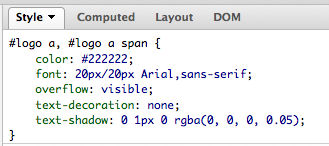
Next my CSS after I changed it in firebug on the fly

Now my logo with styling changed

I can then very easily copy and paste my changes I made in firebug into an external CSS file that will be used to overwrite the standard CSS permanently.
I also changed the styling of my employee report and the region title by changing it on the fly then copying it into my file

Once I have created my file I can then either store it on my server or upload to APEX
To upload to to APEX you can navigate to shared components then Cascading Style Sheets and upload the file

By doing this I can then reference the file inside my page template underneath the standard CSS or alternatively on each page by adding to the header text in the page definition

Once I have then linked the file my changes are then included on the page

One thing to be aware of is if you include the CSS in the page template then it will be modified on every page.
Thursday, 1 March 2012
Easy Email Example
This ones a very quick post about a regular expression I use all the time to validate email addresses within my applications.
A while a go now I had the need to do this and I believe got the regular expression from http://regexlib.com and added into my application.
The regular expression which hasn’t failed me as yet is:
^((\s*[a-zA-Z0-9\._%-]+@[a-zA-Z0-9\.-]+\.[a-zA-Z]{2,4}\s*[,;:]){1,100}?)?(\s*[a-zA-Z0-9\._%-]+@[a-zA-Z0-9\.-]+\.[a-zA-Z]{2,4})*$
This should let all valid emails through and find all emails which aren’t valid.
This is how it should look when implemented. Obviously the item its linked to will very depending on the name of your item.

Saturday, 25 February 2012
Dynamic Action Hide and Show Example
Recently I have seen a few people posting on the forum asking how you can hide and show items in APEX 4 and above, because of this I thought I would do a quick example.
The example is based on a simple registration form where a user can either choose to complete a private registration or register with company details.
I didn’t require the company information from the user if they was registering privately so I wanted to hide these fields.
So this is what I did, the first thing was to create my page items:

Page 102 is where I created my items and is where they will appear. The item that determines if they are hidden or shown is the P102_REGISTRATION_TYPE which is a select list item and has the following static values: STATIC2:Private;PRIVATE,Company;COMPANY
The next step is to create a dynamic action that will hide and show the various items.
First we have to say when it will fire

This states that when the P102_REGISTRATION_TYPE item which is the select list is changed and has a value of COMPANY then we want to the true actions to fire if not then the false actions should fire
The true and false actions can be seen below


So in the true actions I wanted to show the company items but hide the address item as I don’t need both a company and personal address.
In the false action I needed the address but nothing else
I have also checked the box when creating them that states that I want it to fire on page load.
This is a very simple way to hide and show items in a page dynamically without the page needing to be reloaded each time the select list is changed.
Previously jQuery was used to perform such actions but with the inclusion of dynamic actions in APEX 4 this became very simple using the approach above.
Monday, 13 February 2012
2011 Highlights
I wanted to detail some of my highlights from 2011:
- Graduating from Leeds Metropolitan University in July where I graduated in a first class honours degree in computing.
- Beginning working full time for APEX_Evangelists after finishing university and after having worked part time for them previously.
- Speaking at Kscope for the second time, it was another fantastic opportunity and experience
- Speaking at UKOUG for the first time. Having such a large room and so many people interested in what APEX has to offer really shows the growing interest in the product
- APEX_Evangelists also launched the APEX Quiz which can be found athttp://apex-challenge.com as part of the PL/SQL Challenge website
Tuesday, 13 December 2011
UKOUG 2011
This was my first year at ukoug and I found it a really enjoyable and worthwhile experience. There were many great presentations. I luckily had the chance to see some of these.
Hilary presentation gave an excellent explanation of the latest error handling functionality apex has and how you can create an error table to hold your messages inside.
Roel did a great presentation on dynamic actions and how they can be used to control the content on your apex page.
John did a presentation that seemed to be very well received on the data dictionary outlining how you can use the apex views to display information about your application in the application such as charts and that tell you the average page load time for a user.
I also did an apex presentation that introduced beginners and gave a taster to new users to the tool and some the steps that can be taken to build an apex page. I had the biggest room I had ever presented in which was great
With the largest amount of people I had ever presented to which was also great. Having the opportunity to present at ukoug was a great honour and I want to thank all those that face me that chance.
With the largest amount of people I had ever presented to which was also great. Having the opportunity to present at ukoug was a great honour and I want to thank all those that face me that chance.
One other presentation that has to be mentioned is cary milsaps keynote. If was a fantastic presentation, describing both his career and family life. You could tell the presentation came from his heart and it really was really felt by a lot of people. He talked about the key moments in his life and how without a number of events happening there things wouldn’t have happened.
Tuesday, 9 August 2011


About the APEX Challenge and future direction

The APEX Challenge was launched by Apex Evangelists on 24th June 2011 as part of the PL/SQL Challenge website. The APEX Challenge is a quiz designed to test APEX developers’ skills and knowledge.
The weekly APEX quiz can be played at http://www.plsqlchallange.com. All you have to do is register and then you can login and play for free.
The number of users participating in the APEX Challenge has been growing week on week since it was first launched, with a range of players of all levels now taking part. The quiz allows you to challenge your colleagues for pride and gain stature within the APEX community through our range of player rankings.
Each month and quarter, prizes will be awarded to the top-ranking players. There is also a quarterly playoff, where participants compete in a ten-question shootout against the other top-ranked players in their category.
I have been part of the development team for the PL/SQL Challenge and APEX Challenge since they were first introduced, initially whilst working with Apex Evangelists on my placement year at university. I graduated in July and became a full-time developer working with John Scott and Dimitri Gielis at Apex Evangelists.
Part of my work is to continue the development of the APEX Challenge as well as writing and reviewing some of the quiz questions.

What we would really like is for the developers who are playing the quiz to submit their own questions; this will give a more diverse range of questions and help us build a large library.
To submit a question, log in to your account and click “Submit Quiz” on the orange navigation bar at the top of the page.
Our aim is for the APEX Challenge to be a great learning experience for our quizzers so here are some of the ideas we have for developing the quiz going forward:
Coming Soon
· Create an APEX application where players can access the answers to each question
· Give read-only application builder access to our past question library so players can access the area where quiz question authors test the questions. This will enable players to see the code behind the questions and test the results.
· Include some questions with screenshots to make the quiz more exciting
· A new APEX welcome page to better promote the APEX quiz
Possible ideas for the future
· Switch to a daily quiz but this would require a much larger question library
· Possibility of a live APEX quiz at an event with a number of APEX developers
Tuesday, 19 July 2011
ODTUG Kaleidoscope 2011
The reason I'm writing this post is to try to give a brief introduction to what Kaleidoscope is and my experience of it. The reason I have written this a few weeks later is that, since attending the conference, I have returned to begin full-time work after completing my degree so I’ve been rather busy.

First of all, what is Kaleidoscope?
Well, it's the annual conference organised by ODTUG (Oracle development tools user group). Although my view is slightly biased as this is the main conference I have attended, I have listened to what other developers have said and many of them, particularly on the APEX track, which I am most interested in as an APEX developer myself, have said that this is their favoured technical conference to attend.
You can see some of the leading APEX developers blogs and their opinion on the conference at APEX Blogs
The conference provides me with a great learning experience along with the opportunity to pass on my ideas and things I have learnt as a presenter as well as the chance to interact with some of the very best APEX developers in the world.

Saturday Arrival and Registration
Day 1 - the Sunday Symposium
The main highlight for me was hearing about the new features that will be included in the next version of APEX. The new mobile integration to be included will be phenomenal. The new error handling is going to make life easier and allow my applications to be much more user-friendly. Some other cool things were the fact that you can now fire dynamic actions from a button and one pet hate of all APEX developers for years has been the fact that a region and item button were different, this will be no longer be the case and the item button will match the region button. You can read the statement of direction and test some of the new features in the early adopter release 2 at http://tryapexnow.com
Day 2 - Monday
Although I had limited time to watch presentations on the monday, the main highlight had to be my own presentation. Although it was similar to the one I did the previous year, it was great for me to pass on some of my tips and help people learn some things that have helped me in the past. It focussed on tips and tricks that I have learnt and looking at some of the under-used features within APEX that can help developers enhance their applications.
Day 3 – Tuesday
There were many excellent presentations. Dan McGhan’s plugin session showed some really cool plugins. Dimitri Gielis’ session demonstrating how we work within Apex Evangelists was very interesting. The highlight had to be Martin D’Souza’s “APEX 4 + HTML 5 = Awesome”. For this presentation, he won the speaker award for the conference overall. Some of the things he showed included the ability to define the type of input for your text field. The web sockets are very cool with the ability to use REST requests from the database to the client’s browser. You can download the slides from Martin’s blog at http://www.talkapex.com
Day 4 - Wednesday
Again, there were a number of really cool presentations. John Scott presented a really great presentation on plugins showing off some really interesting ones and discussed how to create the different plugin types you can use. Watching Steven Feuerstein’s presentation on "Best Practices for PL/SQL Development in APEX" was very interesting. Having worked with Steven on the PL/SQL Challenge project, it was interesting to see how he described different aspects of the project and practices used.
I also did my second presentation which was the last session of the day so people were excited about the evening ahead but I still had a good crowd which was nice to see. It focused on building an APEX page and how the different parts of the page link together, as well as simple examples in changing templates. This had a number of demos with different questions asked about various parts of the presentation, which is great as a presenter.
The main highlight  of the Wednesday had to be the fantastic night on the Queen Mary. It really was a privilege to be able to visit such a famous ship. Seeing the really funny comedian Don McMillan do two great shows was also very good. This really was an awesome night and I want to thank ODTUG for surpassing any expectations I had.
Day 5 – Thursday
On the final day the awards were people and people were rightly awarded for their contribution to the conference and the class of their presentations.
I also attended Shakeeb Rahman’s presentation on “Oracle Application Express: User Interface Design & Themes”, which showed some really cool examples of what you can do with your themes.
In closing I want to thank all the staff and volunteers for all their hard work that made the conference such a wonderful experience to attend and present at.
You can also register for next years conference at http://kscope12.com
All I can say is, roll on San Antonio next year and I hope it will be as memorable as this one.
Wednesday, 1 June 2011
First class grade and how I got there!
Well, I want to pass on some of my thoughts on how I achieved a first class degree. Over my 2nd and 3rd years I reached a 75% average, the threshold for achieving a first class being 70%. I achieved this through hard work, motivation, desire and the willingness to succeed.
I have listed a few dos and don’ts below that may help other students to succeed:
DO
· Attend your lectures – you will always learn something useful
· Read and re-read your module specifications – it’s very important to actually make sure you’re doing what you’re meant to be and you have not gone off course and done something different
· Speak to other students - don’t copy but share ideas, it will definitely help you
· Use your lecturers – fortunately my lecturers were very approachable and I could see them in person or email them to ask questions. You are paying for them, make sure you use them
· Put the hours in and plan your time
DON’T
· Leave things until the last minute - they will always take longer than you think
· Work all day and all night – the odd all-nighter is ok but your brain stops functioning after 36 hours (trust me I know!)
· Forget to back up your work
· Leave applying for a placement until the last minute
· Forget to submit your work
Hopefully this will offer some suggestions to help you achieve your goals.
Tuesday, 31 May 2011
Final year at university
I thought I would share some of the aspects of my final year and why I have been so busy. The final year was by far the most challenging for me. Throughout the year I covered 8 modules on a range of subjects. I did some C# programming and some PHP website development.
The most exciting parts for me though were the advanced database modules and the final year project. In the first advanced database module we focussed on data warehousing and star schemas. This was something I hadn’t done before so I found it very interesting. I would post the assignment and solution but university may use the same case study next year so I don’t want to give away the answers!
In the second advanced database module, we looked at PL/SQL procedures and functions. I also worked with PL/SQL for the majority of my placement year so I found a fairly complex function and procedure to impress my tutors.
The rest of my modules were based on a final year project. The idea behind this was to follow the waterfall project lifecycle to create a product following each stage. I completed this project as a member of a two-person team rather than on my own, which meant significantly more progress could be made.
As part of the modules I also had to write three 3500 word essays. The first outlined the scope for the project and a range of project planning documents. The second report was a research report that looked at a range of journals, books and other websites to give us ideas for our product. The final report was an evaluation of the project as a whole and considered aspects that went right as well as what went wrong and how this could be improved in the future.
I thought it would be good to give an overview of what I did in my final year so any potential future computing students as well as employers within the industry could get an idea of what was involved.
Blog Neglected
Well unfortunately due to a very busy year at university and work along side of that my blog got neglected. You can however expect this to change for the foreseeable future, I have revamped my blog and intend to be blogging much more. I want to pass on some of the new things I’m learning as my career further progresses. You can also find me at ODTUG Presenting two APEX presentations in June. So come back soon to see my newest blogs!
Thursday, 22 July 2010
ODTUG - 2 weeks on
I've been back in the UK a couple of weeks now. I decided to leave it a little while before writing this post as I figured it would give me time to fully comprehend the ODTUG conference and what I had done as well as where I had been.
ODTUG Kaleidoscope was the first conference on this scale that I had been to anywhere in the world. I feel one of the luckiest people alive as I got to go while doing a work placement with Sumneva as an attendee and even got to present which was truly amazing, (a blog post on presenting will follow in the next week so I won't talk about that now).
I had never even been to the US before so the conference was a real eye opener for me. I'm not sure what I was expecting before I went but I got that plus a whole lot more. I was pleasantly surprised at how friendly everyone was, I was expecting everyone to be nice to each other but it really showed me how the sense of community spirit thrives within the APEX community.
The people I met at Kaleidoscope truly made the conference fantastic for me. Don't get me wrong the presentations were great and I learned a lot but it was people I met and the friendship I gained that made the conference so wonderful. Unfortunately there are far to many people to list that I met and made friends with, but to all those I met and you know who you are. I just want to say thank you for making it such a great experience and I hope to see you all again soon.
Ok now for some of the great presentations I saw.
I was at the conference from the Sunday so I was up early and ready to go for the...
Sunday Symposium - APEX A to Z
This was really cool seeing and application been built from start to finish. This was definitely a valuable session for me and showed me how different people present in different ways. I'm sure for anyone who hadn't used APEX before this would have been a true eyeopener on how easy APEX is to use and how easy it is to build a new application. This was a great first day and gave me an idea of what to expect for the rest of the week.
Monday
I started off watching by watching the keynote speech. We had some fun at the start where the audience participated sending texts and things and ended the first part of the session by announcing the the location of ODTUG Kaleidoscope which is been held in Longbeach California. The second part of the keynote was intriguing, it was someone called Lee Rainie who gave the keynote. He had some very interesting ideas especially on future trends of the internet.
The second session I saw was Anton Nielsen - How to Hack and APEX Application. This was a really cool session, I did know quite a few different ways that an APEX page could be hacked such as manipulating the URL and using firebug to change values but I did learn a few new tricks.
I then had a few hours off and practiced for my presentation at 2.30pm. This was very scary as it got closer and closer but a new blog post will follow to describe in more detail.
Tuesday
I started off the day in Johns Scott's session 'APEX Features We Should All be Using but Probably Aren't' - I work with John every day but thought I would watch his session and I can say I picked up some tips, I don't user master applications as much as I should so something I certainly have to bear in mind.
The next thing I went to was Patrick Wolf's hands on Lab - 'Oracle Application Express Dynamic Actions'. This was really good fun, due to the amount of work I had been doing running up to ODTUG I had very little time to really get to grips with APEX 4 and all its new features. This was great opportunity to have a look at the dynamic actions. We were given a worksheet and a laptop so I gradually worked through the sheet. It wasn't super complex but gave me a better idea of how the dynamic actions worked. I can say that the hands on labs are definitely worth while.
The final presentation of the day for me was Dimitri Gielis - 'Mastering an APEX Page'. It was an interesting session he covered a number of APEX features but the most interesting for me was learning how the debug worked in APEX 4. It's no longer the same, it doesn't appear on the page any more as it did before. You get a popup window to use debug now. It's a pretty cool enhancement from the previous debug.
Wednesday
I decided to watch Dan McGhan - 'JavaScipt in APEX - A Lesson for the PL/SQL Developer' and I picked up a few tips. Dan was an excellent presenter and using a variety of slides he gradually went through using JavaScript and APEX, mainly using jQuery and showed people how easy it is to combine APEX with jQuery to do some really cool things. It was definitely one worth watching and that I would recommend to anyone who wants to use JavaScript with APEX.
My next presentation today was Dimitri Gielis - 'My First Months With APEX 4.0'. I had seen Dimitri present earlier in the week and he didn't disappoint this time either. What he did live was export an APEX 3.2 application and rebuild it in 4. This was a really cool presentation and something that he accomplished with some style. Upgrading to APEX isn't always a smooth transition at the best of times so doing it in front of people was definitely a challenge. Watching him do this was definitely inspirational and I could see the room really appreciated what he did.
Well that's it my adventure was over and it was time to head back home after a day's work and a days sightseeing. It certainly was an unbelievable experience that I will be eternally grateful for getting the chance to do. I enjoyed every minute of it and I just hope one day I will get to go again to see all the great people I met and enjoy the week as I have this year.
This blogpost has taken me a while to write as I wanted to try and get a decent amount of content in it so I hope it has given you an idea of my experience of ODTUG Kaleidoscope 2010.
ODTUG Kaleidoscope was the first conference on this scale that I had been to anywhere in the world. I feel one of the luckiest people alive as I got to go while doing a work placement with Sumneva as an attendee and even got to present which was truly amazing, (a blog post on presenting will follow in the next week so I won't talk about that now).
I had never even been to the US before so the conference was a real eye opener for me. I'm not sure what I was expecting before I went but I got that plus a whole lot more. I was pleasantly surprised at how friendly everyone was, I was expecting everyone to be nice to each other but it really showed me how the sense of community spirit thrives within the APEX community.
The people I met at Kaleidoscope truly made the conference fantastic for me. Don't get me wrong the presentations were great and I learned a lot but it was people I met and the friendship I gained that made the conference so wonderful. Unfortunately there are far to many people to list that I met and made friends with, but to all those I met and you know who you are. I just want to say thank you for making it such a great experience and I hope to see you all again soon.
Ok now for some of the great presentations I saw.
I was at the conference from the Sunday so I was up early and ready to go for the...
Sunday Symposium - APEX A to Z
This was really cool seeing and application been built from start to finish. This was definitely a valuable session for me and showed me how different people present in different ways. I'm sure for anyone who hadn't used APEX before this would have been a true eyeopener on how easy APEX is to use and how easy it is to build a new application. This was a great first day and gave me an idea of what to expect for the rest of the week.
Monday
I started off watching by watching the keynote speech. We had some fun at the start where the audience participated sending texts and things and ended the first part of the session by announcing the the location of ODTUG Kaleidoscope which is been held in Longbeach California. The second part of the keynote was intriguing, it was someone called Lee Rainie who gave the keynote. He had some very interesting ideas especially on future trends of the internet.
The second session I saw was Anton Nielsen - How to Hack and APEX Application. This was a really cool session, I did know quite a few different ways that an APEX page could be hacked such as manipulating the URL and using firebug to change values but I did learn a few new tricks.
I then had a few hours off and practiced for my presentation at 2.30pm. This was very scary as it got closer and closer but a new blog post will follow to describe in more detail.
Tuesday
I started off the day in Johns Scott's session 'APEX Features We Should All be Using but Probably Aren't' - I work with John every day but thought I would watch his session and I can say I picked up some tips, I don't user master applications as much as I should so something I certainly have to bear in mind.
The next thing I went to was Patrick Wolf's hands on Lab - 'Oracle Application Express Dynamic Actions'. This was really good fun, due to the amount of work I had been doing running up to ODTUG I had very little time to really get to grips with APEX 4 and all its new features. This was great opportunity to have a look at the dynamic actions. We were given a worksheet and a laptop so I gradually worked through the sheet. It wasn't super complex but gave me a better idea of how the dynamic actions worked. I can say that the hands on labs are definitely worth while.
The final presentation of the day for me was Dimitri Gielis - 'Mastering an APEX Page'. It was an interesting session he covered a number of APEX features but the most interesting for me was learning how the debug worked in APEX 4. It's no longer the same, it doesn't appear on the page any more as it did before. You get a popup window to use debug now. It's a pretty cool enhancement from the previous debug.
Wednesday
I decided to watch Dan McGhan - 'JavaScipt in APEX - A Lesson for the PL/SQL Developer' and I picked up a few tips. Dan was an excellent presenter and using a variety of slides he gradually went through using JavaScript and APEX, mainly using jQuery and showed people how easy it is to combine APEX with jQuery to do some really cool things. It was definitely one worth watching and that I would recommend to anyone who wants to use JavaScript with APEX.
My next presentation today was Dimitri Gielis - 'My First Months With APEX 4.0'. I had seen Dimitri present earlier in the week and he didn't disappoint this time either. What he did live was export an APEX 3.2 application and rebuild it in 4. This was a really cool presentation and something that he accomplished with some style. Upgrading to APEX isn't always a smooth transition at the best of times so doing it in front of people was definitely a challenge. Watching him do this was definitely inspirational and I could see the room really appreciated what he did.
Well that's it my adventure was over and it was time to head back home after a day's work and a days sightseeing. It certainly was an unbelievable experience that I will be eternally grateful for getting the chance to do. I enjoyed every minute of it and I just hope one day I will get to go again to see all the great people I met and enjoy the week as I have this year.
This blogpost has taken me a while to write as I wanted to try and get a decent amount of content in it so I hope it has given you an idea of my experience of ODTUG Kaleidoscope 2010.
Subscribe to:
Posts (Atom)